
Staying connected in Iceland is actually pretty important. It’s not just about posting photos; it’s about navigation on roads that you’re unfamiliar with, weather alerts that can change your entire day’s plan, a safety net if something goes wrong somewhere remote and, of course, paying for Iceland’s legendary parking. Sorting out a SIM for Iceland before you go, or within minutes of landing, is an easy fix. Here’s our guide to the best SIM for Iceland…
THIS POST MAY CONTAIN COMPENSATED AND AFFILIATE LINKS MORE INFORMATION IN OUR DISCLAIMER
If you’re weighing up WiFi in Iceland against getting your own data, or just trying to work out internet in Iceland before you commit to a plan, I’ll walk through it in order: whether you actually need a SIM at all, eSIM versus a physical SIM, our picks for both, whether a hotspot from your rental car company is worth it (a very good option for groups who’d rather share one connection than each sort out their own), and where WiFi itself is and isn’t reliable.
PRACTICAL TRAVEL TIPS
- 🛡️ Get Travel Insurance: Civitatis includes medical expenses, repatriation, theft, luggage delays. No deductibles or upfront payments. Get a quote here.
- 🛏️ Sea view? Laundry? Private bath? Book a Room.
- 🔌 Be ready for the plug, socket & power situation.
- 📶 Get online EASILY & cheaply – One eSim for the world. Data never expires
Why You Need a SIM Card in Iceland?
A working data connection in Iceland isn’t a luxury; it’s closer to a practical requirement, and here’s why.
BEST eSIM ICELAND

The Best eSIM Card for Iceland
If you want to get online as soon as you land, make sure you can pay parking fees by app, and navigate your way around Iceland, the this eSIM from Airalo is the perfect option. Easy to use, easy to manage.
Parking in Iceland
Plenty of parking in Iceland, both on Reykjavik streets and at tourist attractions, runs entirely through apps like Parka and EasyPark. No signal means no way to pay, and no way to pay means a fine that follows you home through your rental company. Read our guide to parking in Iceland for the full rundown of how that system works.
Maps
Google Maps and offline maps both have a place here. Download offline maps as a backup before you set off each day; they’ll get you out of trouble if you lose signal somewhere remote. But real-time data is particularly useful too: live traffic would have been useful if we’d been paying attention when we returned from the Snaefellsnes Peninsula on a Sunday evening, road closures, and rerouting around anything that’s changed since you last checked. Offline maps and apps are covered in my guide to essential apps for Iceland. You can read it here.
Plans Change
The weather in Iceland can turn fast enough to change your whole day, and road closures happen with little warning in the wrong season. Iceland’s coverage is excellent almost everywhere you’ll actually drive, so there’s little real reason to go without a way to check road.is or vedur.is on the move.
One thing worth having regardless of which SIM option you choose: the 112 Iceland app. It’s free, official, and built for exactly the kind of remote hiking or driving trip Iceland encourages. You can “check in” periodically so the system has your last known location, and there’s a one-tap emergency button that sends your GPS coordinates by SMS and dials the emergency number for you. It only needs to be able to send a text, so it works even in patchy signal that couldn’t support a phone call.
If you’re coming from an EU or EEA country, you may not need a local SIM at all. Iceland sits in the European Economic Area rather than the EU itself, but the EU’s “Roam Like at Home” rules extend to EEA countries too, so your existing SIM should work exactly as it does at home, at no extra cost. It’s worth confirming the specifics with your own provider before you go, but for a lot of European travelers this whole section may simply not apply.
And one easy thing to overlook: check that your phone is actually unlocked before you travel. A phone still locked to your home carrier won’t accept a local SIM or eSIM, no matter how good a deal you’ve found.
eSIM vs. Physical SIM — Which Should You Choose
To my mind, eSIMs win on convenience; you can buy one before you’ve even left home, and it activates automatically the moment you land. The trade-off is that most eSIMs are data-only, with no local phone number and no SMS support, which matters if you’re planning to lean on the 112 Iceland app’s check-in and emergency features; those need to send a text.
A physical SIM gets you a local number and full SMS support, but you’ll need to actually find somewhere selling one and swap it into your phone. Either way, make sure your phone is unlocked and eSIM-compatible before you commit to one over the other.
We both have global SIMs. Mine is an eSIM (this one), and Nigel has a physical SIM. We have them and pay by the second for access; it covers us for wherever we land, or whichever border we cross. You can read more about our favorite global sim and eSIM here.
Best eSIM Options for Iceland
A handful of providers cover Iceland well, worth comparing directly against each other since pricing and data allowances shift often enough that we won’t pin ourselves to exact numbers here. If you’re combining Iceland with other European countries on the same trip, a regional Europe eSIM can work out better value than a country-specific one; just check the data allowance carefully since regional plans sometimes cap out lower than Iceland-only ones. Get your eSIM here
Best Local Physical SIM Options
Síminn, Nova, and Sýn (which runs the Vodafone-branded network under license) are the three real choices. Síminn has the most extensive coverage overall, especially useful if you’re planning a proper Ring Road drive, while Nova’s newer 5G network is strong but still concentrated mostly around Reykjavik. You can get connected to the Síminn network using Airalo here.
All three sell starter packs at the same convenience store in Keflavík Airport’s arrivals hall, (you can read my guide to arriving at Keflavik here) plus at gas stations and their own branded stores a little outside Reykjavik’s city center. Only physical SIMs are available at the airport itself. If you specifically want an eSIM from one of these providers rather than a global eSIM company, you’ll need one of their actual phone stores – or Get your eSIM here
Get a WiFi Hotspot from your Rental Car Company
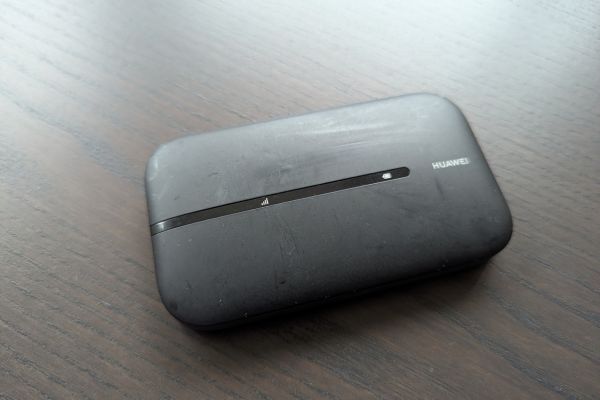
Renting a car is also one of the easiest ways to sort connectivity for the whole trip; plenty of Iceland’s rental companies offer a mobile WiFi hotspot as an add-on, and sometimes it’s bundled in already.
What It Gives You
A dedicated device that connects multiple phones, tablets, and laptops at once, unlimited or high-allowance data for the length of your rental, and one connection the whole car shares rather than everyone sorting out their own SIM.
What It Doesn’t Give You
A mobile hotspot doesn’t give you a local phone number; there are no calls, no texts, and no 112 Iceland app support since that needs SMS. It’s also tied to the car; once you’re out walking around without it (so put it in your pocket, don’t leave it in the car), you’re back to relying on your phone’s own signal.
Why It’s a Great Option
If it’s bundled into your rental cost, it’s effectively free connectivity you’re already paying for, a big saving over buying a separate SIM. And if you’d otherwise be hotspotting off your own phone to cover everyone else in your group, a dedicated device saves your phone’s battery for the entire trip instead of draining it every time someone needs directions. For families or groups traveling together, it’s often the simplest option on the table. You can check out options for renting a car with a hotspot here.
WiFi Availability in Iceland
WiFi is everywhere in Iceland; hotels, cafes, restaurants, museums, (my guide to Iceland’s unique museums is here) and visitor centers almost all offer it free. That said, public WiFi is exactly that, public, so avoid anything sensitive like online banking over it, and a VPN is worth having if you’re doing much of your browsing this way.
Public WiFi is a fine backup, but don’t build your whole trip around finding it. It’s fixed in place, and Iceland’s biggest draws are anything but.
Our Recommendation
If you’ve got a European phone plan that includes EEA roaming, use it and save yourself the hassle entirely. Otherwise, an eSIM is our pick for most people, it’s set up before you land, and Síminn’s network if you go the physical SIM route, particularly if you’re driving the Ring Road. Add a rental car hotspot into the mix if you’re traveling as a group and want one shared connection rather than four separate ones. Whatever you choose, install the 112 Iceland app regardless; it costs nothing, and it’s exactly the kind of thing you’ll be glad to have if you never need it and gutted to be without if you do.
FAQs on SIM Cards for Iceland
Got questions about SIM and data access in Iceland? Here are our quick answers to the questions we hear most about staying connected in Iceland.
Do I need a SIM card for Iceland?
Not strictly; WiFi covers a lot of ground and EU/EEA travelers may already have roaming included. But for navigation, safety, and just general convenience, most people find having their own data worthwhile.
Is eSIM better than a physical SIM for Iceland?
For most people, yes, it’s faster to set up and often cheaper. The main trade-off is losing SMS support, which matters if you want to use the 112 Iceland app’s full features.
BEST eSIM ICELAND
The Best eSIM Card for Iceland
If you want to get online as soon as you land, make sure you can pay parking fees by app, and navigate your way around Iceland, the this eSIM from Airalo is the perfect option. Easy to use, easy to manage.
Is WiFi widely available in Iceland?
Yes, hotels, cafes, and museums almost all offer it free. It’s a good backup, just not a substitute for your own data if you’re driving between places all day.
Is a hotspot useful for Iceland?
Very, especially for groups. One device covers everyone in the car, and if it’s included in your car rental cost, it can work out cheaper than several individual SIMs.
Will I have signal on the Ring Road or in remote areas?
Mostly, yes, coverage along the Ring Road itself is very good. It gets patchier in the Highlands and some remote valleys, which is exactly where offline maps and the 112 app matter most.
How much data do I need for a week in Iceland?
It depends on how much you’re navigating and streaming, but most people traveling for a week are comfortable somewhere in the 10-20 GB range if they’re using maps regularly and posting a reasonable amount online.
Can I buy a SIM card at Keflavík Airport?
Yes, a store in the arrivals hall sells physical starter packs from all three Icelandic providers. eSIMs from those same providers aren’t available at the airport itself, only at their branded stores.
What else do I need to do before arriving in Iceland?
Start with my how to plan a trip to Iceland guide here, then take a look at my what to pack for Iceland. Both posts have further links on what you need to do beforehand.
ICELAND TRAVEL RESOURCES
AIRPORT TRANSFERS
24/7 pickup & drop off. Trusted, local English speaking drivers. Prebook & prepay online with cards.
Book a Transfer
HOTELS AND APARTMENTS
See choices here
Rooms with a view? Budget rooms? Need a washing machine? The best choice of hotels & apartments.
TOURS & ATTRACTIONS
Most excursion choices, small group tours, skip-line tickets, free cancellation and top local guides.
Top options here.
CAR RENTAL OPTIONS
Choose cars here
Best choice of vehicles, automatics, large or small cars, child seats. Book early for more options.
Final Words on the Best SIM for Iceland
Getting connectivity sorted for Iceland is one of the easiest things to get right before you travel, and one of the few really low-stakes decisions on the whole trip. Whether you land on an eSIM, a local SIM, or a hotspot from your rental car, the main thing is having something, given how much of Iceland runs on apps for parking, and how much peace of mind comes from being able to check the weather or call for help if you need to. Sort it early, and it becomes one less thing to think about for the rest of the trip.
ASocialNomad is a participant in the Amazon Services LLC Associates Program, an affiliate advertising program designed to provide a means for sites to earn advertising fees by advertising and linking to amazon.com, amazon.co.uk, and amazon.ca. Amazon and the Amazon logo are trademarks of Amazon.com, Inc. or its affiliates. As an Amazon Associate, I earn from qualifying purchases.

